
 Available for Restaurants Across India
Bhojoo POS Restaurant Billing Software for India
Run dine-in, takeaway and food-service operations through one practical restaurant POS software. Manage fast billing, live KOT, tables, payments, inventory, staff access and owner reports with guided setup and support from Adwing Technologies.
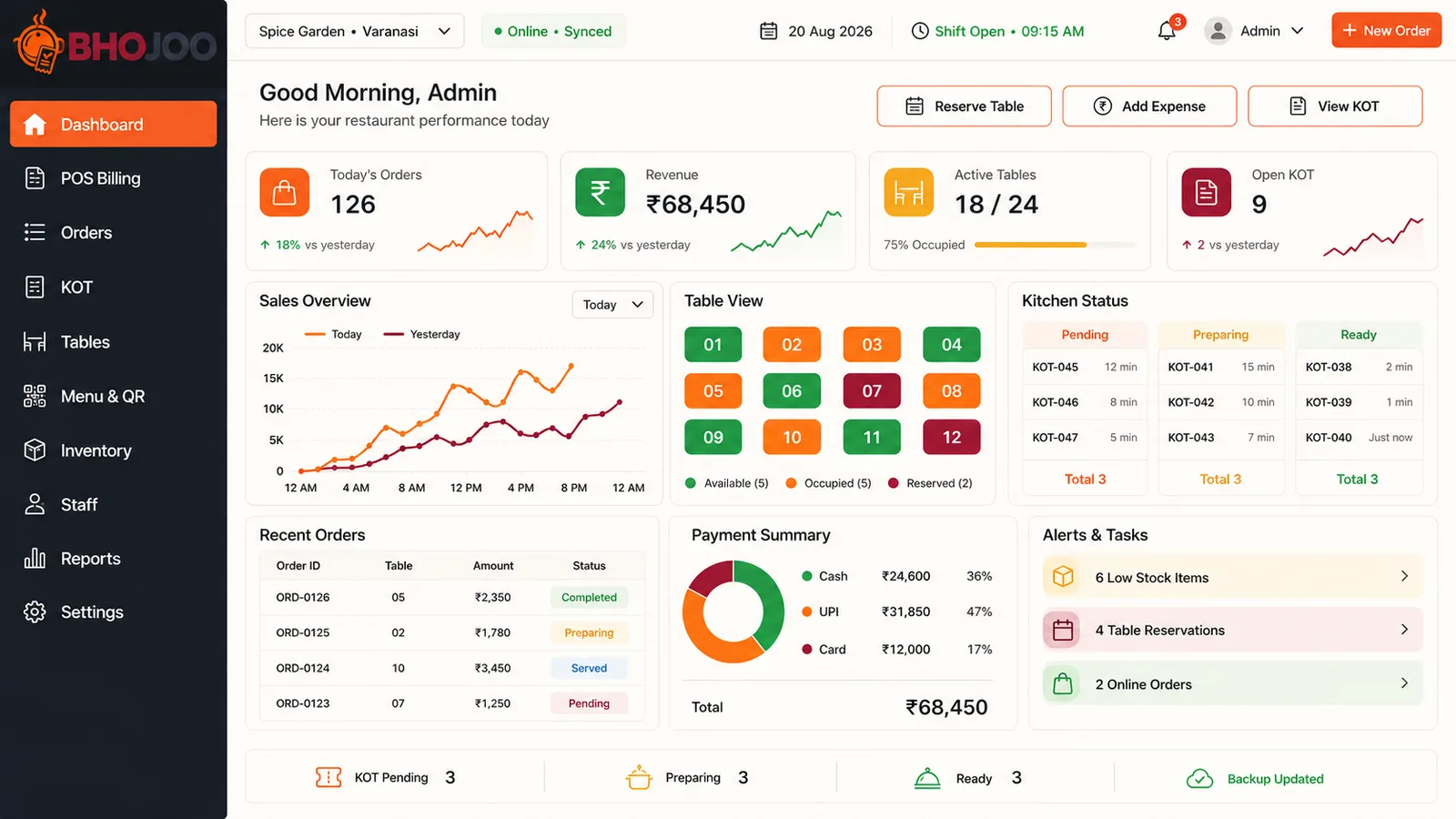
Restaurant Billing Software That Connects Counter, Kitchen and Owner
Bhojoo follows the complete service cycle: select a table, add items, send the KOT, continue repeat orders, prepare the customer bill, record the final payment and update operational reports. This reduces disconnected KOTs, unclear table status and payment-mode errors.
Explore Every Major Bhojoo Restaurant POS Module
Each visual below is a focused view from the original Bhojoo dashboard, paired with the practical controls used during restaurant operations.
POS Billing and Order Management
Create quick restaurant bills with category filters, food items, quantity, tax, notes and order totals. Choose dine-in, takeaway or the configured order type, then keep running and settled orders synchronized.
Live KOT and Kitchen Workflow
Send clear kitchen instructions and move tickets through Hold, Pending, Preparing, Ready and Served. Repeat items create an ADD KOT while corrections remain visible as controlled adjustment instructions.
Table, Floor and Reservation Management
Create floors or service areas, add physical table numbers, set seating capacity and see whether a table is available, occupied/running or reserved. A dine-in table becomes vacant only after final settlement.
Billing, Payment and Final Settlement
Give the customer an unsettled bill first, then record the confirmed payment. Accept Cash, UPI, Card or Split Payment, calculate cash change and maintain payment-mode-wise records for daily closing.
Inventory, Consumption and Wastage Control
Maintain raw materials such as rice, paneer, oil and packaging with consistent units. Record purchases, consumption, wastage and physical adjustments while monitoring current balance and reorder levels.
Restaurant Reports, Audit and Owner Control
Review order totals, daily sales, payment modes, KOT backlog and stock alerts. Sensitive actions such as payment correction, KOT adjustment and settled-bill void approval remain traceable for accountability.
Restaurant and Café Billing Features in One System
Beyond the six main modules, Bhojoo includes the supporting controls required for menu setup, printing, staff use and daily exception handling.
Menu and QR
Create food categories, rates, GST settings, descriptions, availability and a mobile-friendly QR menu.
Complimentary Items
Record no-charge items without hiding them from the order trail and operational history.
Same-Table Repeat
Continue the existing running order and issue an ADD KOT only for newly added items.
KOT Adjustments
Update, cancel or replace using clear instruction tickets while preserving the original trail.
Change Return
Enter cash received and calculate the correct amount to return to the customer.
Split Payment
Divide one bill between Cash, UPI and Card with applicable references and validation.
Mode Correction
Correct an authorized payment mistake with a mandatory reason instead of deleting the bill.
Void Approval
Process settled-bill void requests through an admin-controlled and auditable workflow.
Thermal Printing
Print kitchen KOT, customer bill and final settlement bill with restaurant and GST details.
Staff Permissions
Give admin, cashier, waiter and kitchen users only the modules needed for their role.
Order Search
Find running or settled orders and review synchronized billing and preparation information.
Responsive Access
Use permitted restaurant screens on desktop and mobile according to the selected deployment.
How Bhojoo Restaurant POS Works During Service
One connected workflow keeps table status, kitchen instructions, final billing and payment reporting aligned.
Remote Demo, Setup Guidance and Training for Indian Food Businesses
Adwing Technologies supports restaurants and cafés across India through online product demonstrations, requirement review, configuration guidance, user onboarding and support according to the selected plan. Share your outlet type, tables, counters, users, printing and deployment requirement for a suitable quotation.
Questions About Bhojoo POS Restaurant Billing Software
Answers for restaurant owners evaluating billing, KOT, table, payment, inventory and deployment requirements.
What businesses can use Bhojoo restaurant POS software?
Bhojoo can support restaurants, cafés, QSR and takeaway counters, cloud kitchens, hotel restaurants, bakeries and similar food-service businesses. The final setup depends on outlet workflow, tables, counters, users and required modules.
Can it manage dine-in and takeaway orders?
Yes. Bhojoo supports dine-in and takeaway workflows, with table selection for running dine-in orders and no-table handling for applicable counter orders.
Can a repeat order continue on the same table?
Yes. New items are added to the same running order and issue an ADD KOT, while the final customer bill stays combined until settlement.
Can a KOT be updated, cancelled or replaced?
Yes. Authorized workflows can issue update, cancellation or replacement instructions while keeping the original KOT history available for operational clarity.
When does an occupied table become vacant?
The table remains running after customer-bill printing and kitchen completion. It becomes available only after the payment is finally settled.
Which restaurant payment modes are supported?
Cash, UPI, Card and Split Payment are supported. Cash settlement can record cash received and calculate change; applicable UPI and Card references can also be stored.
Does Bhojoo include restaurant inventory management?
Yes. Inventory items, purchase/stock-in, consumption/stock-out, wastage, physical adjustment, current balance and reorder-level visibility can be maintained. Confirm any advanced recipe-linked automation required for your selected build before purchase.
Can waiter, kitchen and cashier permissions be separated?
Yes. Role-based access can be configured for admin or manager, cashier, waiter and kitchen users according to operational responsibility.
Can Bhojoo print KOT and restaurant bills?
Yes. The workflow supports kitchen KOT, customer bill and final settlement bill printing. Printer size, browser print settings, restaurant logo and GST details should be tested during setup.
Is Bhojoo available across India?
Adwing Technologies can provide remote product demonstration, requirement consultation, configuration guidance, onboarding and applicable support across India. Deployment scope and support terms are confirmed in the final quotation.
Will it work during an internet interruption?
Deployment and short-outage behaviour depend on the selected build and environment. Share your online, local or hybrid requirement during consultation so the exact supported workflow can be verified before implementation.
See Bhojoo POS Working With Your Restaurant Workflow
Tell us your business type, city, number of counters or tables and required modules. Get a focused demonstration and quotation from Adwing Technologies.