
 Restaurant POS · KOT · Billing · Inventory
Bhojoo Restaurant POS Software From Order to Settlement
Manage dine-in, takeaway, KOT, table operations, billing, settlements, stock, staff permissions and business reports from one practical restaurant management system.
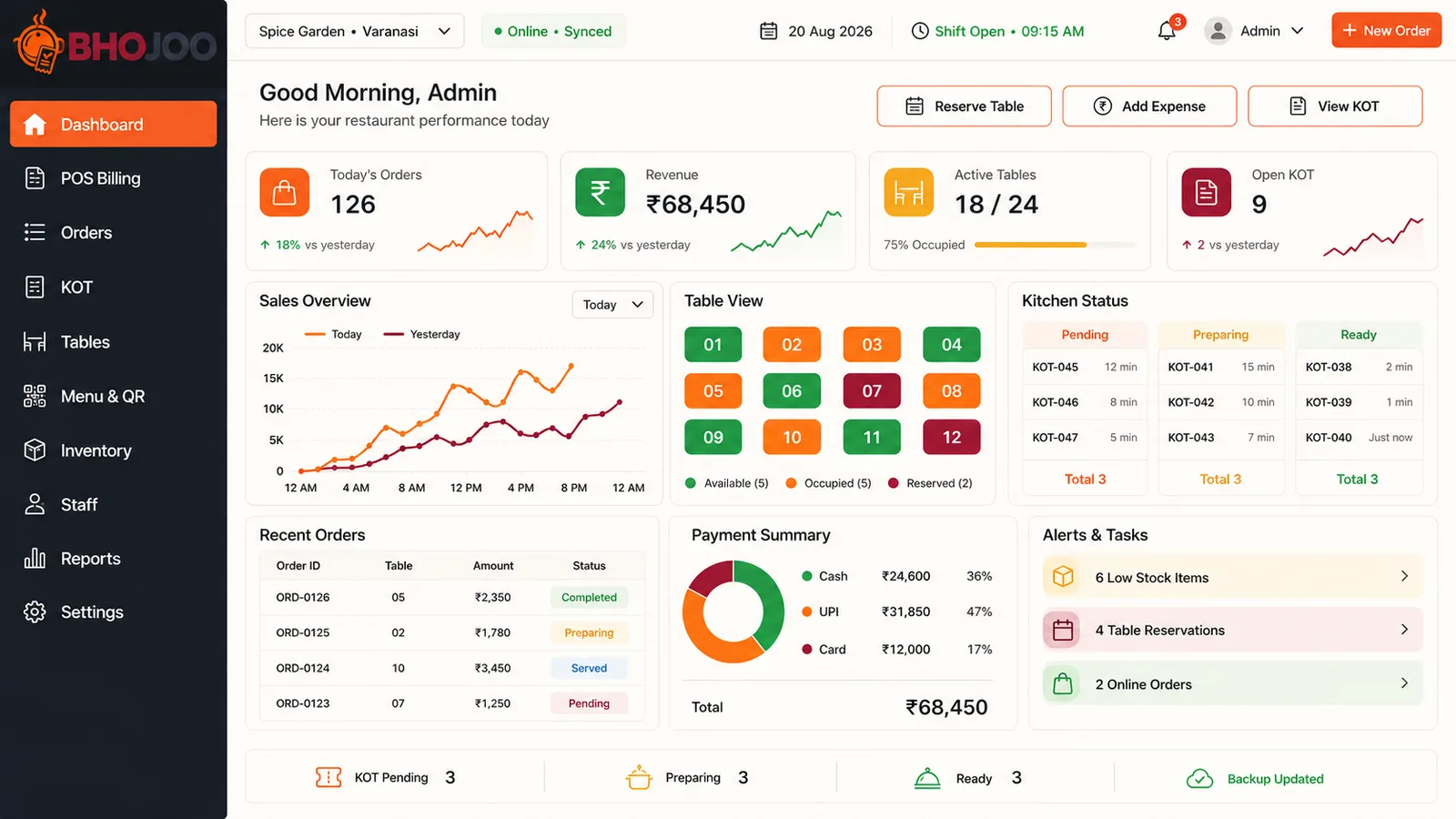
One Restaurant POS for Front Desk, Kitchen, Tables and Owner Control
Bhojoo is designed around the real restaurant workflow: create an order, send KOT, continue repeat orders on the same table, modify items safely, print the customer bill, settle by the correct payment mode and keep a reliable audit trail.
Complete Restaurant Workflow
Designed so waiter, kitchen, cashier and admin each get the controls required for their role.
Everything Bhojoo Brings to Restaurant Operations
From order entry and kitchen instructions to settlement, correction, stock control and management reporting.
POS Billing
Fast item selection, quantity, rates, taxes, notes, order totals and billing for daily restaurant operations.
Live KOT Management
Create and print kitchen tickets with live status such as pending, preparing, ready and served.
Same Table Repeat Order
Add new items to an existing running table. ADD KOT contains only the newly ordered items while the final bill stays combined.
Modify KOT
Update quantity, cancel an item, replace an item or cancel a full KOT using separate kitchen instructions.
Table & Floor Management
Manage restaurant floors, table numbers, capacity and status such as available, occupied/running and reserved.
Table Reservation
Reserve tables with time-based restaurant planning and keep reservation status visible to the operating team.
QR Menu Ordering
Mobile-friendly QR menu for guests with categories, item details and restaurant ordering workflow.
Menu, Category & Rates
Create categories and menu items, maintain price, GST/tax, item availability and descriptions.
NC / Complimentary Items
Mark applicable items as no-charge/complimentary while keeping operational visibility and order history.
Customer Bill / Unsettled Bill
Print or review the customer bill before payment. The order remains running until final settlement.
Final Settlement
Settlement closes the order, records the payment and makes a dine-in table vacant/available.
Cash Received & Change Return
Enter cash received, calculate change automatically and prevent incorrect cash settlement below the payable amount.
Round Off
Automatically handle bill round-off so net payable and cash handling remain clear on the final settlement bill.
Split Payment
Settle one bill using Cash + UPI + Card portions, with references and payment-mode-wise reporting.
Payment Mode Correction
Authorized users can correct a settled payment mode with reason and audit history instead of deleting the bill.
Settled Bill Void Approval
Void a settled bill through controlled approval, admin authorization and auditable actions.
Inventory & Low Stock
Track stock items, stock transactions, current balances and low-stock/reorder alerts for restaurant control.
Recipe Costing
Connect recipe consumption with inventory to understand item-level raw material usage and food cost.
Staff & Role Permissions
Separate controls for admin, cashier, waiter and kitchen users with permission-based access to modules.
Order Search & History
Search orders, review running/settled records and maintain synchronized totals across billing and order screens.
KOT & Bill Printing
Print customer bills, final settlement bills and kitchen KOT copies with restaurant/GST information.
Reports & Payment Summary
Today sales, order totals, Cash/UPI/Card/Split summaries, transaction reports and kitchen/KOT status reports.
Audit Logs
Track sensitive changes such as payment correction, void approval and KOT adjustments for better accountability.
Hybrid / Offline-Capable Workflow
Suitable for restaurant deployments where local operations and online access/sync capability are required.
Responsive Mobile Use
Restaurant screens are designed for desktop and mobile use for quick operational access by permitted users.
From Table Selection to Final Settlement
Bhojoo keeps one continuous operational trail rather than creating disconnected KOTs and bills.
Built for Real Restaurant Exceptions — Not Just Simple Billing
Bhojoo provides controlled workflows for repeat orders, kitchen changes, payment mistakes and settlement accountability.
Repeat & Modification Control
Same table keeps the same running order until settlement.
- NEW KOT + ADD KOT
- Update quantity
- Cancel item / full KOT with reason
- Replacement KOT
- Original KOT history preserved
Payment & Settlement Control
Clear customer bill and owner settlement workflow.
- Unsettled customer bill
- Cash received & change return
- Automatic round off
- UPI/Card references
- Split payment
Correction & Approval
Correct mistakes through auditable actions rather than deleting records.
- Payment mode correction
- Mandatory correction reason
- Settled bill void approval
- Admin/manager control
- Audit trail
Owner & Daily Closing
Daily reports help match digital records with physical collections and kitchen activity.
- Today sales & orders
- Payment mode summary
- Transaction report
- KOT status / backlog
- Low-stock report
Right Screen and Permission for the Right Team Member
Permissions can be configured according to operational responsibility.
| Role | Typical Access | Daily Responsibility |
|---|---|---|
| Waiter | Tables, POS, Orders, Menu | Take orders, repeat order, correct table selection, customer service |
| Kitchen | KOT Board, Orders | Process pending → preparing → ready → served and adjustment tickets |
| Cashier | POS, Orders, Tables, Reports | Customer bill, settlement, payment mode and references |
| Admin / Manager | All permitted controls | Menu, staff, correction, approval, audit, settings and closing reports |
Restaurant Businesses That Need Faster, Clearer Operations
Restaurant POS Software Questions
Can Bhojoo manage repeat orders on the same table?
Yes. A running dine-in table can receive additional items without creating a separate order. New items generate an ADD KOT and the final bill remains combined.
Can a printed KOT be updated, cancelled or replaced?
Yes. Bhojoo uses controlled adjustment tickets for quantity updates, cancellation and replacement instead of silently overwriting the original KOT history.
Does the table become vacant when the customer bill is printed?
No. Printing the customer bill does not settle the payment. The table remains running/occupied until final settlement is completed.
Which payment modes are supported?
Bhojoo supports Cash, UPI, Card and Split Payment. Cash settlement can record cash received and calculate change return, while UPI/Card payments can store references.
Can a wrong payment mode be corrected after settlement?
Authorized users can use payment correction with a mandatory reason and audit history, so the bill does not need to be deleted.
Does Bhojoo provide inventory and low-stock control?
Yes. Inventory, stock transactions, current stock and low-stock/reorder visibility are available, along with recipe-costing support.
Can staff access be restricted?
Yes. Role-based permissions can be configured for users such as admin, manager, cashier, waiter and kitchen staff.
Can Bhojoo be used on mobile devices?
The interface is designed for responsive access. Deployment options can also be planned according to the restaurant's online, local or hybrid operating requirement.
Bring Billing, Kitchen, Tables and Payments Into One Bhojoo Workflow
Discuss your restaurant size, number of counters/tables, billing requirement, kitchen workflow and deployment preference with Adwing Technologies.