
LabPro Pathology Lab Software for Modern Diagnostic Laboratories
LabPro is a complete pathology laboratory management software designed to manage patients, billing, sample collection, test processing, result entry, validation, report approval, visual reporting, multi-branch operations, portals and laboratory analytics from one secure web-based platform.
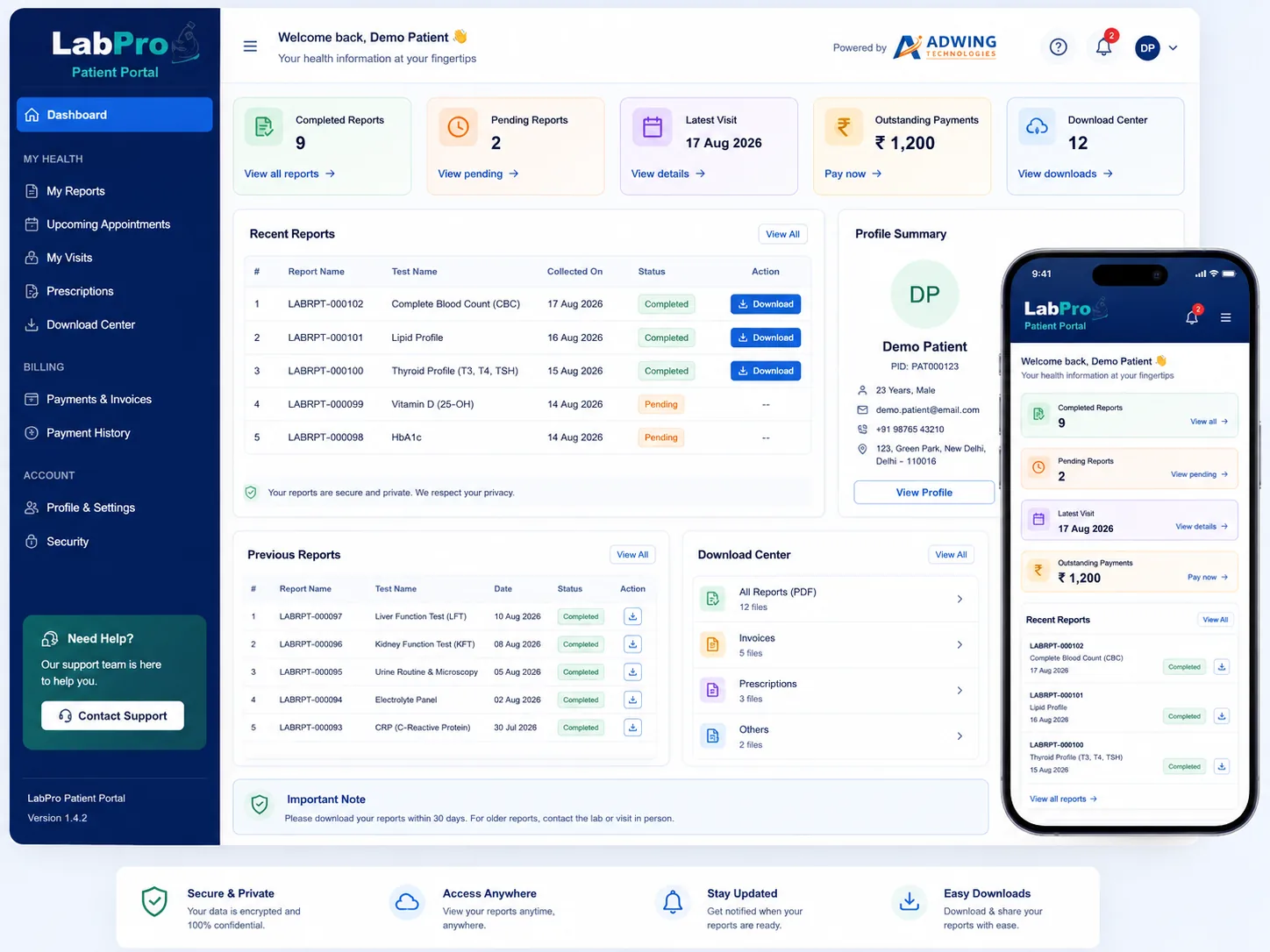
Simplify Your Complete Pathology Lab Workflow
Managing a diagnostic laboratory requires coordination between reception, billing, sample collection, technicians, validation, pathologists and report delivery. LabPro brings these processes together in one centralized pathology lab software system.
From patient registration and doctor referral to final report approval and WhatsApp report sharing, LabPro provides a structured workflow designed for growing pathology laboratories and diagnostic centres.
Explore All ModulesComplete Laboratory Workflow
Every department works with the same patient and test data while access remains controlled according to user role.
Everything Required to Manage a Modern Pathology Laboratory
LabPro combines laboratory operations, patient management, financial workflow, reporting, administration and business analytics in one integrated pathology software platform.
Dashboard
Real-time overview of patients, samples, results, reports, collections and pending laboratory work.
Patient Management
Register patients, maintain patient records and manage laboratory visits from a centralized interface.
Doctor / Referral Management
Maintain referring doctors and connect patient visits with doctor/referral information.
Test Master
Configure laboratory tests, parameters, units, formulas and supporting test configuration.
Profile & Package
Combine multiple laboratory tests into convenient diagnostic profiles and testing packages.
Reference Range Manager
Configure reference ranges according to supported age and gender conditions for report preparation.
Formula Engine
Configure supported calculated parameters using laboratory-defined formulas with formula validation tools.
Billing & Payments
Generate bills, manage payment collection and monitor outstanding payment information.
Doctor Commission
Track referral-related commission information with controlled financial access.
Sample Collection
Manage sample collection status, laboratory processing and pending sample workflow.
Result Entry
Structured parameter-wise result entry with reference and calculated value support.
Result Validation
Separate validation stage before final pathology report approval.
Report Approval
Pathologist-controlled approval workflow before releasing final patient reports.
Classic Reports
Generate clean traditional pathology reports from validated laboratory results.
Visual Reports
Present supported laboratory results using modern visual reporting while using the same underlying result data.
WhatsApp Logs
Maintain report sharing and WhatsApp communication logs for better operational tracking.
Inventory
Maintain laboratory inventory records through role-controlled inventory management.
Users & Roles
Configure staff access for reception, billing, technician, pathologist, accountant and other permitted roles.
Backup Management
Controlled backup tools designed to protect laboratory business information.
Audit Logs
Maintain important activity records for administrative monitoring and accountability.
From Patient Registration to Final Pathology Report
LabPro provides a structured end-to-end laboratory workflow so each department knows what needs to happen next.
Manage Multiple Laboratory Branches from One System
LabPro supports branch-aware laboratory operations, allowing diagnostic businesses to organize booking branches, processing branches, branch pricing, sample transfers, reporting and business analysis within one platform.
Branch-Specific Access
Assign permitted branches to appropriate laboratory users.
Branch Pricing
Support branch-specific test and service pricing workflows.
Sample Transfer Tracking
Track sample movement between supported collection and processing branches.
Understand Laboratory Performance with Better Data
LabPro Analytics & MIS provides operational and business visibility through date and branch-based reporting.
Business KPIs
Track important operational and financial laboratory metrics.
Workload & TAT Monitoring
Identify pending workload and delayed turnaround cases.
Branch Analytics
Compare supported laboratory performance across branches.
Dedicated Login Portals for Laboratory, Doctors and Patients
LabPro separates operational laboratory access from doctor and patient portal access for a cleaner and safer user experience.
Laboratory Staff Login
Role-based access for authorized laboratory administrators and staff.
- Lab Admin
- Reception
- Billing
- Sample Collector
- Technician
- Pathologist
- Accountant / Viewer
Doctor Portal
Referring doctors can use a separate secure portal without receiving clinical editing permissions.
- Referred patient visibility
- Released pathology reports
- Commission statements
- Separate secure login
Patient Portal
Provide patients with separate access to supported released laboratory information.
- Independent patient login
- Released report access
- Secure patient-specific data
- Convenient report availability
Designed for Laboratory Control, Accuracy and Scalability
LabPro combines operational automation with controlled clinical workflow and secure administrative tools.
Reference Range Logic
Configure supported age and gender based reference range rules for laboratory tests.
Formula Calculations
Configure laboratory-defined calculated parameters using formula mappings and validation tools.
Classic + Visual Reports
Generate different report presentation formats using the same validated result data.
Secure Update Manager
Controlled software update workflow with preflight verification, backup and rollback support.
Training & Help
Built-in training resources make staff onboarding and software use easier.
Demo & Deployment Controls
Controlled commercial deployment and restricted demonstration account workflows.
Built for Controlled Laboratory Data Access
LabPro follows a multi-laboratory architecture with role-based access controls and laboratory-level data separation.
Pathology Software for Independent Labs and Growing Diagnostic Networks
Independent Pathology Labs
Digitize patient, sample, result and report processes through one central software platform.
Diagnostic Centres
Improve coordination between reception, billing, technicians and reporting teams.
Multi-Branch Laboratories
Manage multiple collection or processing branches with centralized control.
Growing Lab Businesses
Use analytics, portals, workflow control and user permissions while expanding laboratory operations.
See LabPro Pathology Lab Software in Action
Experience the complete Patient → Billing → Sample → Result → Validation → Approval → Report workflow through a live product demonstration.
We can demonstrate laboratory operations, reporting, portals, multi-branch features, analytics and user access according to your requirement.
LabPro Pathology Software FAQs
What is LabPro Pathology Lab Software?
LabPro is a web-based pathology laboratory management system for patient registration, doctor referrals, billing, sample collection, result entry, validation, pathology report approval, reporting, portals and laboratory administration.
Does LabPro support multiple laboratory branches?
Yes. LabPro supports branch-aware workflows including branch assignments, pricing, booking and processing branches, sample transfers, reporting and branch-level analytics.
Does LabPro provide Doctor and Patient portals?
Yes. LabPro includes separate Doctor and Patient portal login workflows with access restricted to the information appropriate for each portal.
Can pathologists approve reports before release?
Yes. LabPro includes separate result entry, validation and report approval workflow before supported reports are released.
Does LabPro support pathology test formulas?
LabPro includes a configurable formula system for supported calculated laboratory parameters. Formula configuration should be verified by the laboratory/pathologist according to its analyzer, method and units.
Is LabPro suitable for a single pathology lab?
Yes. It can be used for a single laboratory and can also support growing multi-branch laboratory operations.
Can we request a LabPro demonstration?
Yes. Use the demo request form on this page to schedule a live demonstration of the required modules and workflow.
Ready to Modernize Your Pathology Laboratory?
Request a live walkthrough of LabPro Pathology Lab Software.