
QR Code Menu Ordering for Restaurants | BHOJOO POS
BHOJOO connects a mobile-friendly QR menu with table identification, Live KOT, repeat ordering, payment and customer order tracking—so digital orders become part of the restaurant's normal POS and kitchen workflow.
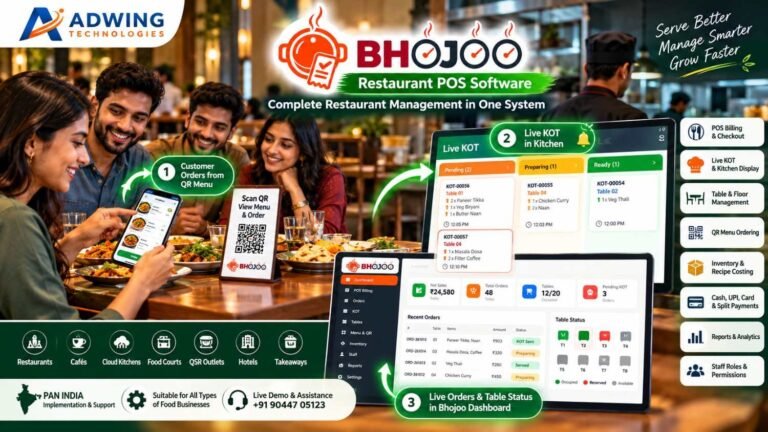
QR Code Menu Ordering for Restaurants : How BHOJOO Connects the Customer, Kitchen and Counter
A QR code on a restaurant table should do more than open a PDF menu. The right QR ordering system lets customers scan, browse, customize and place an order from their own phone. The order should then reach the correct table bill and kitchen workflow without the waiter or cashier entering it again. That is the difference between a basic digital menu and a connected QR code menu ordering system for restaurants.
BHOJOO is designed around this connected workflow. It brings the customer-facing QR menu together with POS billing, Live KOT, kitchen display, table management, online payment options, customer order tracking, inventory and restaurant reports. Restaurant teams continue using one operational system while customers get a faster, more convenient ordering experience.
What Is QR Code Menu Ordering for Restaurants ?
QR code menu ordering allows a guest to use the camera on a smartphone to open a restaurant’s digital menu. No separate mobile application is required. The menu opens in the browser and can show:
- Item names, prices and descriptions
- Food images
- Veg and non-veg indicators
- Sizes and variants
- Add-ons and modifiers
- Combo meals
- Availability and timed-menu items
- Tax and pricing details
In a complete system, the guest can add items to a cart, enter meal instructions and submit an order. For dine-in service, the system identifies the table from its unique QR code. The order then moves into the restaurant’s POS and KOT process. The customer does not need to wait for a waiter only to ask for the menu or place another round. At the same time, the restaurant does not lose control because the order is recorded in its normal operational workflow.
How BHOJOO QR Table Ordering Works
The BHOJOO QR ordering journey can be understood in seven simple steps.
1. A Unique QR Code Is Assigned to the Table
The restaurant generates or prints a QR code for each table. The QR can be placed on a table stand, tent card, sticker or printed tabletop card. Because the QR carries the table context, the customer does not need to type a table number manually. This helps reduce orders being sent to the wrong table.
2. The Customer Scans and Opens the Mobile Menu
The guest scans the QR using the phone camera. A responsive digital menu opens in the browser, without forcing an app installation. Customers can browse categories, view images and descriptions, check prices and choose the required size, variant, add-on, modifier or combo where these options are configured.
3. The Customer Builds the Cart
The guest selects items and quantities and can provide relevant meal instructions—for example, less spicy, no onion or separate packing. Clear item configuration is important here. When options are shown correctly in the menu, the customer knows exactly what is being ordered and the kitchen receives clearer instructions.
4. The Order Reaches BHOJOO with the Table Number
After the customer submits the order, it is recorded in BHOJOO against the correct table. Depending on the restaurant’s operating policy, the order can move into the configured confirmation and kitchen process. The table number, items, quantity and meal instructions remain connected with the order instead of appearing on an unrelated device.
5. Live KOT Reaches the Kitchen
The order can enter the Live KOT workflow with the item and table information needed by the kitchen. Kitchen users can manage stages such as:
- Pending
- Preparing
- Ready
- Served
The restaurant can use a kitchen display, KOT print workflow or both, depending on its setup.
6. Customers Can Place a Repeat Order
If guests want another drink, an extra starter or dessert, they can use the same table ordering journey again. The repeat order remains associated with the running table instead of creating confusion at the counter. This is especially useful during busy hours, when customers may otherwise wait several minutes to call a waiter.
7. Payment and Final Settlement Complete the Bill
The restaurant can keep an order unsettled until the guest decides how to pay. Cash, UPI, card or supported online payment workflows can then be recorded according to the restaurant configuration. BHOJOO separates the customer bill and final settlement workflow where required. This gives the service team flexibility while maintaining a clear payment record for the owner.
Why QR Ordering Should Be Connected with the POS and KOT
A standalone QR menu may look modern but still create more work. If QR orders arrive on a separate phone or tablet, a staff member may have to re-enter them in the POS. That produces several risks:
- Double entry at the counter
- Missed orders during rush hours
- Wrong table mapping
- Items reaching the kitchen late
- Separate customer and waiter bills
- Incorrect sales and payment reports
- Inventory not matching actual sales
BHOJOO is intended to keep QR orders, waiter-entered orders, table bills and the kitchen workflow connected. The restaurant team can therefore manage both digital and staff-assisted orders without maintaining two independent systems.
What Changes for the Restaurant Team?
QR ordering does not remove the need for good service. It changes where the team spends its time.
For Waiters
Waiters spend less time repeatedly carrying menus and manually noting straightforward orders. They can focus more on greeting guests, answering food questions, serving, checking table satisfaction and handling special requests. Guests who prefer personal service can still order through a waiter. A practical restaurant system should support both customer self-ordering and staff-assisted POS ordering.
For the Kitchen
The kitchen receives structured items, quantities, table information and recorded instructions. Clear KOT status gives front-of-house staff better visibility into what is pending, preparing or ready.
For the Cashier
The cashier can work with orders already recorded against the table. At billing time, the running order can move through the selected payment and settlement process instead of being reconstructed from handwritten slips.
For the Owner
The owner gets a more complete operational record covering orders, KOT progress, tables, payments, menu performance and—where recipes are mapped—stock consumption. BHOJOO’s owner dashboard and reports are designed to make this information easier to review.
How QR Ordering Can Improve Restaurant Revenue
QR ordering is not only about contactless service. When the menu and ordering flow are designed properly, it can also improve revenue opportunities.
Consistent Add-On Suggestions
A busy waiter may forget to suggest extra cheese, a beverage, a larger portion or a dessert. A digital menu can display available add-ons and modifiers consistently for every eligible item.
Easier Repeat Ordering
Customers are more likely to order an additional beverage or dessert when the process takes a few taps. They do not need to wait until a waiter notices them.
Better Product Presentation
Food images, useful descriptions, clear pricing and organised categories can help customers understand the menu and discover items they may not have considered from a text-only card.
Combos and Variants
BHOJOO Menu Management can support sizes, variants, add-ons, modifiers and combos. Restaurants can use these options to offer clearer choices and structured upselling instead of relying only on verbal suggestions.
Faster Service During Peak Hours
Reducing the wait for a menu and initial order can help the restaurant begin preparation sooner. Faster order movement can improve the guest experience and may help table utilisation during busy periods.
Results still depend on menu design, food quality, staffing, pricing, internet availability and restaurant execution. QR ordering is an operational tool—not a substitute for hospitality.
QR Menu vs QR Ordering vs Online Ordering
| Capability | QR Menu Only | QR Table Ordering | Online Pickup/Delivery Ordering |
|---|---|---|---|
| Customer can view menu and prices | Yes | Yes | Yes |
| Customer can add items to cart | No | Yes | Yes |
| Identifies a restaurant table | Usually no | Yes | No |
| Sends order to POS/KOT | No | Yes | Yes, when integrated |
| Supports repeat table order | No | Yes | Not applicable |
| Typical use | Menu browsing | Dine-in self-ordering | Takeaway, pickup or delivery |
Many restaurants eventually need more than one of these experiences. Maintaining them from a connected menu system helps reduce duplicate item entry and inconsistent prices.
How to Set Up QR Ordering Properly
Use a Real Mobile Menu, Not a Heavy PDF
The menu should open quickly on ordinary mobile data. Categories, buttons, prices and images need to remain readable on a small screen. Compress images before upload so visual quality does not make the page unnecessarily slow.
Place the QR Where Customers Can See It
Use a clean table stand or tent card at a visible position. Add a short instruction such as:
Scan to view the menu and order from your phone—no app required.
Keep Item Information Complete
Add prices, tax configuration, descriptions, food type indicators, images, variants and availability carefully. A digital menu with missing details creates questions instead of reducing them.
Test Every Table QR
Before going live, scan every code and verify that it opens the correct table. Test with both Android and iPhone devices and check the complete flow from menu to dashboard, KOT and printed output.
Decide How Orders Will Be Confirmed
Some restaurants may want orders to move directly into the kitchen workflow. Others may want staff verification before preparation. The correct choice depends on service style, stock accuracy and the possibility of guests scanning the wrong QR.
Train the Team
Waiters, cashiers and kitchen staff should understand:
- How a QR order appears
- How table and instructions are displayed
- How repeat orders are handled
- Who can modify or cancel a KOT
- How payment and final settlement work
- What to do if the internet or customer phone is unavailable
Keep Staff Ordering Available
Not every guest wants to use a phone. Elderly customers, groups with limited connectivity and guests who want recommendations may prefer a waiter. A strong setup keeps both options available and routes them into the same restaurant workflow.
Common QR Ordering Mistakes to Avoid
1. Using Only a PDF Menu
A PDF may display the menu, but it usually does not provide a proper cart, table mapping, modifiers, repeat ordering, Live KOT or payment workflow.
2. Forcing an App Download
Most dine-in guests do not want to install an app for one meal. Browser-based ordering lowers that friction.
3. Showing Outdated Prices or Unavailable Items
Digital and counter prices should remain aligned. Availability must be updated so guests do not order items the kitchen cannot prepare.
4. Sending Digital Orders to a Separate Device
If the kitchen team has to monitor an extra tablet disconnected from KOT, orders can be delayed or missed. Integration with the normal order and kitchen queue is essential.
5. Ignoring Meal Instructions
Instructions must remain visible with the correct item and KOT. Staff should also have a process for clarifying unusual requests before preparation.
6. Poor Mobile Layout
Small buttons, cropped prices, hidden cart totals and overlapping controls quickly make customers abandon self-ordering. The entire menu and checkout journey must be tested on mobile screens.
7. No Operational Backup
The restaurant should retain a waiter/POS workflow for customers who cannot use QR ordering or whenever connectivity is interrupted.
BHOJOO Features That Support the QR Ordering Journey
BHOJOO is more than a QR menu. Its connected restaurant workflow can include:
- Mobile-friendly QR menu and table ordering
- Table-linked orders and repeat ordering
- Live KOT with table, item and instruction details
- Pending, preparing, ready and served kitchen stages
- KOT printing and kitchen display workflows
- POS billing for dine-in, takeaway and delivery
- Unsettled customer bill and final settlement
- Cash, UPI, card and split-payment workflows
- Customer order tracking where configured
- Menu images, categories, variants, modifiers and combos
- Floor-wise table management and running bills
- Customer master, loyalty points and wallet workflows
- Inventory, recipe consumption and wastage
- Supplier, purchase order, GRN and outstanding management
- Shift opening, day closing and cash reconciliation
- Owner mobile dashboard, alerts, reports and analytics
- Role-based permissions, audit trail and backup controls
- Self-order kiosk, token display, reservation, waitlist and feedback modules
Restaurants can activate the modules suited to their service model and deployment plan.
Which Restaurants Can Benefit Most?
QR code menu ordering is particularly useful for:
- Casual dining restaurants
- Cafés and bakeries
- Quick-service restaurants
- Food courts
- Bars and lounges
- Hotel restaurants
- Takeaway counters
- Cloud kitchens with direct ordering requirements
Fine-dining restaurants may use the QR primarily for menu browsing, wine or dessert selection and payment while keeping waiter-led ordering at the centre of the experience.
Is QR Ordering Secure?
Restaurants should treat QR ordering as part of their operational and payment security—not merely a printed code.
Use QR codes generated for the correct restaurant domain, protect staff functions with role-based access and keep sensitive actions such as settlement changes, bill voids and KOT cancellations controlled. Regular database and file backups are also important.
Customers should be advised to confirm that the page opened by the QR belongs to the restaurant before entering contact or payment information.
Why Choose BHOJOO for Restaurant QR Ordering?
BHOJOO is built to connect the full restaurant journey instead of treating QR ordering as a separate gadget. The same platform can connect customer ordering, waiter POS, table management, KOT, kitchen status, billing, payment, inventory, suppliers, customer loyalty and management reports. This gives restaurant owners one operational view and helps staff avoid repeated data entry. BHOJOO is developed and supported by Adwing Technologies with implementation, training and support options for restaurants in India.
Frequently Asked Questions
Do customers need to install an app for the BHOJOO QR menu?
No. The QR menu is designed to open in a compatible mobile browser. The restaurant should test the published QR journey on common devices before launch.
Can customers order directly from their table?
Yes, where QR ordering is enabled. Each table can use its own QR context so the submitted order is associated with the correct table.
Will a QR order appear in the kitchen?
When the connected workflow is configured, QR orders can enter the Live KOT or kitchen-display process with item, table and instruction details.
Can a customer place another order from the same table?
Yes. Repeat table ordering can add another round to the running table workflow instead of forcing the guest to begin an unrelated bill.
Can guests still order through a waiter?
Yes. QR ordering should complement waiter service. Staff can continue using BHOJOO POS while both order paths remain part of the restaurant workflow.
Does BHOJOO support online payment?
BHOJOO supports payment and settlement workflows including cash, UPI and card. Supported online payment options depend on the restaurant’s configured gateway and deployment.
Can customers track the status of their order?
Customer order tracking can be enabled so guests can view relevant progress after placing an order, subject to the restaurant’s configuration.
Does QR ordering update inventory automatically?
When menu items are correctly connected to recipes and the applicable stock-consumption workflow is enabled, restaurant sales can be reflected in inventory movements. Recipe mapping and units must be configured accurately before relying on automatic consumption.
Can BHOJOO work on mobile, tablet and desktop?
BHOJOO uses responsive web-based screens for supported restaurant workflows. Actual access depends on deployment, network availability and user permissions.
Turn Every Table into a Smarter Ordering Point
A good QR menu does not simply replace paper. It reduces ordering friction while keeping the restaurant in control.With BHOJOO, a guest’s mobile order can become part of the same connected flow used by the waiter, kitchen, cashier and owner—from table selection and Live KOT to settlement, stock and reporting. To see how BHOJOO can work for your restaurant, request a live demonstration from Adwing Technologies.
Call or WhatsApp: +91 90447 05123
Email: info@adwingtechnologies.com
Product Details: https://adwingtechnologies.com/restaurant-software/
Live Demo: https://bhojoo.adwingtechnologies.com/login.php

Adwing Technologies
Business software, website design and digital growth support for organisations across India.
Related Business Insights
Turn Your Digital Presence Into Qualified Enquiries
Discuss your website, SEO, software or digital marketing requirement with Adwing Technologies.