
Restaurant Management Software in India
Bhojoo Restaurant Management Software in India Complete Restaurant Control – From Customer Order to Kitchen, Billing, Inventory & Owner Reports Modern restaurants need much more than a billing machine. Customers expect faster ordering. Kitchen teams need accurate KOTs. Waiters need live table information. Cashiers need fast settlements. Owners need control over inventory, suppliers, customers, staff, […]
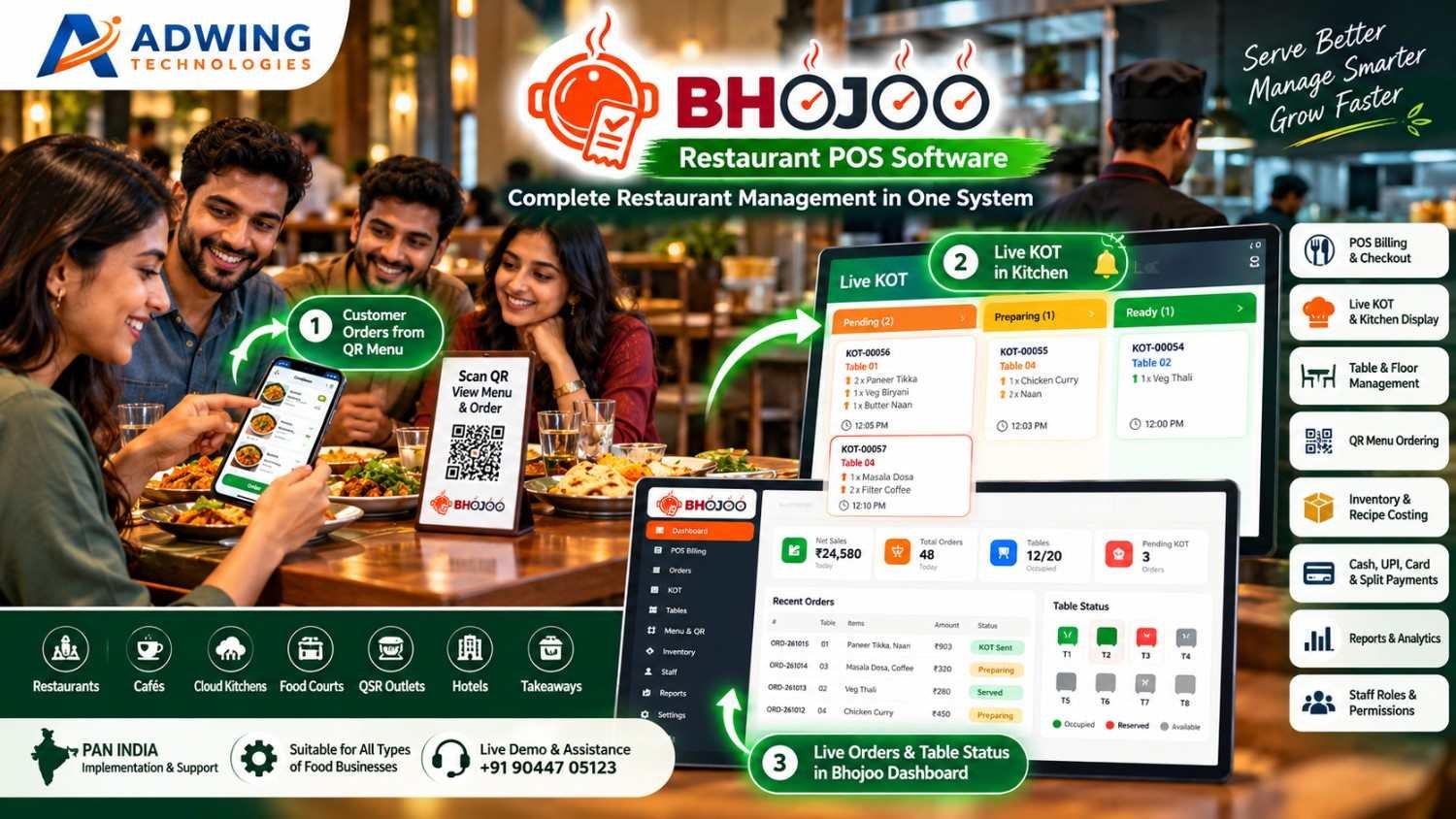
Bhojoo Restaurant Management Software in India
Complete Restaurant Control – From Customer Order to Kitchen, Billing, Inventory & Owner Reports
Modern restaurants need much more than a billing machine.
Customers expect faster ordering.
Kitchen teams need accurate KOTs.
Waiters need live table information.
Cashiers need fast settlements.
Owners need control over inventory, suppliers, customers, staff, payments and daily closing. Bhojoo Restaurant Management Software by Adwing Technologies brings these restaurant operations together through one connected web-based platform.
From POS Billing and Live KOT to QR Ordering, Self-Ordering Kiosk, Digital Kitchen Display, Customer Token Screen, Table Management, Inventory, Supplier Purchases, Customer Loyalty and Business Reports, Bhojoo is designed around the way modern restaurants actually operate.
Serve Better. Manage Smarter. Grow Faster.
CTA: Request Bhojoo Live Demo
Call / WhatsApp: +91 90447 05123
One Restaurant Management System. Multiple Operations Connected.
Bhojoo connects the complete restaurant journey:
Customer Order → Table / QR / Kiosk → Live KOT → Kitchen → Ready Status → Billing → Payment → Inventory → Customer → Reports
Instead of using different software for billing, QR menu, stock, kitchen and customer management, Bhojoo keeps the important restaurant workflow connected. This gives the team a simpler operating process and gives the owner stronger visibility over daily business activity.
Built as a Web & Mobile Restaurant Application
One of Bhojoo’s major strengths is its browser-based restaurant workflow. Authorized users can access relevant Bhojoo screens through supported web browsers according to their login permissions. This makes Bhojoo suitable for different restaurant operating points.
Desktop & Laptop
Use the complete restaurant dashboard, POS, reports, settings and administrative controls.
Tablet
Useful for counter billing, table management, waiter operations or kiosk-style environments.
Mobile
Restaurant owners, waiters and authorized team members can access mobile-friendly workflows according to assigned permissions.
Secure URL-Based Access
Open the restaurant application through the assigned Bhojoo URL, sign in with authorized credentials and access relevant modules. One system designed to work across the restaurant—not only on one billing computer.
Fast POS Billing & Checkout
Bhojoo provides a fast restaurant billing workflow designed for everyday counter operations. Restaurants can manage applicable order types such as:
Dine-In • Takeaway • Delivery
Billing can include item quantity, applicable GST/tax, discounts, round-off, payment information and restaurant-specific transaction details. The billing process remains connected with orders, KOTs, tables, payments and reports.
Customer Bill Before Payment Settlement
Bhojoo can maintain the difference between preparing the customer bill and finally settling the transaction. A customer can request the bill before actually making payment. The running order can remain active until settlement is completed by an authorized user. This reflects how dine-in restaurants actually operate.
Live KOT & Kitchen Display System
The kitchen should know immediately when a new order arrives. Bhojoo provides Live KOT – Kitchen Order Ticket Management to connect order-taking staff with the kitchen. KOT workflow can move through statuses such as:
Pending → Preparing → Ready → Served
Kitchen teams can view active orders, preparation requirements and order status through the live kitchen interface. Waiters and operating staff get better visibility without repeatedly asking the kitchen for updates.
Digital Kitchen Screen
Move beyond only printed KOT slips. Bhojoo can provide a Digital Kitchen Display where active restaurant orders appear on-screen for kitchen staff. The kitchen can identify:
New Orders
Pending Orders
Preparing Orders
Ready Orders
Table Number
Order Items
Special Instructions
This gives kitchens a more organized digital workflow and becomes especially useful during peak restaurant hours.
Same Table Repeat Order – ADD KOT
Customers rarely complete their entire order at once. A table may first order starters and beverages, then add main course and dessert later. With Bhojoo, the same running table can continue receiving additional orders. Only the newly added items can be sent to the kitchen through an ADD KOT, while the final customer bill remains combined. This avoids duplicate billing and keeps kitchen communication clear.
Modify, Cancel & Replace KOT with Control
Restaurant orders sometimes change after being placed. Bhojoo supports controlled KOT operations such as:
Modify Quantity
Cancel Item
Replace Item
Repeat KOT
Cancel KOT
Reprint KOT
Changes can be controlled according to user permissions and operational rules so restaurant owners maintain better accountability.
Smart Table & Floor Management
Bhojoo provides a visual table-management workflow for dine-in restaurants. Restaurants can create different service areas such as:
Main Hall
Family Area
Ground Floor
First Floor
Rooftop
Outdoor Seating
Window Area
Tables can display operational status such as: Available • Occupied • Booked • Reserved This gives the front desk, waiter and cashier a common live view of restaurant seating.
Floating Table View – Faster Table Control
Bhojoo’s table workflow can be presented through a floating / visual table view so staff can quickly see the restaurant floor without opening individual order screens repeatedly. The floating table interface can help authorized users identify:
Which table is running
Which table is free
Which table is reserved
Which tables have active orders
Which table needs attention
Current table order status
This makes table handling especially useful on tablets and mobile-friendly screens.
Quick Table Transfer & Running Order Control
If a guest changes seats or the restaurant needs to move an active party, a running order can be managed through the table workflow rather than recreating the complete bill.
This keeps restaurant operations cleaner and helps reduce duplicate entries.
Public Reservation & Digital Waitlist
Bhojoo can support restaurant reservation and waiting workflows for restaurants that manage busy dining periods. Customers can be added to the reservation or digital waitlist, while authorised restaurant users can monitor upcoming and waiting guests. This can help restaurants manage:
Advance Reservations
Walk-In Waiting Customers
Table Allocation
Estimated Waiting Flow
Reservation Status
A digital waitlist provides a more professional alternative to handwritten waiting registers.
QR Menu – Scan, View & Order from Mobile
Bhojoo transforms the restaurant table into a digital ordering point. Customers can scan a QR code using their mobile phone and access the restaurant’s digital menu. The customer journey becomes:
Scan QR → Browse Menu → Select Items → Choose Table → Add Instructions → Place Order → Live KOT
The customer can order without installing a separate application. This makes QR ordering practical for restaurants that want faster table service and a modern digital experience.
Customer Order Confirmation
After a QR order is successfully placed, the customer can receive a clear confirmation screen with order reference information. This reassures the customer that the order has reached the restaurant and kitchen workflow. The order can then appear inside Bhojoo for authorized restaurant processing.
Self-Ordering Kiosk
For restaurants, cafés, QSR outlets and food courts that want customer self-service, Bhojoo can support a Self-Ordering Kiosk workflow. Customers can use a dedicated tablet or kiosk screen to:
Browse Menu
Select Food
Add Quantity
Choose Options
Review Cart
Place Order
The order can then flow into the restaurant’s Bhojoo order and KOT system. This helps reduce counter dependency and creates a modern quick-service ordering experience.
Digital Customer Token Display
Bhojoo can extend restaurant operations beyond billing and kitchen management with a Customer Token Display. Once an order enters preparation, restaurants can display token/order information on a separate customer-facing screen.
A typical flow can be:
Token Generated → Preparing → Ready → Customer Called
This is especially useful for:
QSR Restaurants
Takeaway Counters
Food Courts
Cafés
Self-Service Restaurants
Fast Food Outlets
Where configured, token-ready status can also be paired with an audible/voice alert to improve customer communication.
Customer Display Screen
Restaurants can use a dedicated screen to communicate important order information to waiting customers. The display can show relevant tokens or order statuses without exposing internal restaurant management information. This keeps the customer-facing experience separate from the cashier or kitchen dashboard.
Advanced Menu Management 2.0
Bhojoo’s Menu Management is designed for more than basic food-item entry. Restaurant operators can manage:
Categories
Menu Items
Food Images
Descriptions
Prices
GST / Tax
Availability
Variants
Combos
Customizations
Recommended Items
Popular Items
This improves both internal POS usability and the customer-facing QR / kiosk menu experience.
Item Availability Control
If an item becomes temporarily unavailable, staff can update its availability rather than deleting the product. This reduces confusion for staff and helps customers avoid selecting unavailable food through digital ordering interfaces.
Inventory & Stock Management
Restaurant profitability depends heavily on inventory control. Bhojoo connects restaurant operations with stock-management workflows.
Restaurants can manage:
Raw Material Stock
Current Stock
Stock Transactions
Low Stock
Reorder Levels
Consumption
Stock Adjustments
Inventory Reports
The goal is to give restaurant owners better visibility over what is available and what is being consumed.
Recipe Mapping & Automatic Stock Consumption
Menu items can be connected with configured recipe ingredients. For example, when a menu item is sold, related ingredient quantities can be consumed from stock according to the configured recipe. This helps owners understand:
Ingredient Consumption
Food Cost
Stock Movement
Recipe Usage
Item Profitability
Restaurant software becomes much more valuable when billing and inventory work together.
Wastage Management
Food wastage affects profit. Bhojoo can maintain wastage and stock-adjustment activity so restaurant owners can identify why inventory changed. This helps distinguish real sales consumption from spoilage, damage or operational wastage.
Supplier Management
Restaurant inventory begins with suppliers. Bhojoo provides supplier-management workflows so purchasing and inventory are not managed separately. Restaurant operators can maintain supplier details and connect them with purchases, received stock and payment information.
Purchase Order → Approval → GRN
Bhojoo supports a structured purchasing workflow:
Supplier → Purchase Order → Approval → GRN → Stock
This allows restaurants to create purchase requirements, approve purchases and record the actual quantity received through Goods Receipt Note processing. Accepted stock can then become part of inventory records.
Purchase Return
If goods are damaged, incorrect or need to be returned, Bhojoo can maintain purchase-return transactions. This keeps supplier records and inventory more accurate.
Supplier Outstanding & Accounts
Restaurant owners can track supplier-related information such as:
Purchases
Payments
Outstanding Amount
Purchase Returns
Supplier Ledger
Pending / Ageing Information
This creates a stronger back-office procurement and account-control workflow.
Customer Database
Bhojoo can maintain customer information for restaurants that want to understand repeat business. Customer history provides the foundation for better loyalty, service and promotional strategies.
Customer Loyalty & Wallet
Bhojoo’s customer-management capabilities can extend into Loyalty and Wallet workflows. Supported restaurant setups can maintain:
Customer Wallet
Advance Balance
Loyalty Points
Repeat Customer History
Special Offers
Discount Programs
This helps restaurants focus on customer retention rather than only first-time transactions.
Customer Feedback Management
Understanding the customer experience is important for improving restaurant service. Bhojoo can include a Customer Feedback workflow so restaurants can collect structured feedback after dining or ordering. Feedback can help management understand areas such as:
Food Quality
Service Experience
Restaurant Experience
Order Accuracy
Overall Satisfaction
This creates a structured customer-feedback channel rather than relying only on informal comments.
Fast Payments – Cash, UPI & Card
Bhojoo supports practical restaurant settlement workflows through commonly used payment modes such as:
Cash • UPI • Card
Restaurant payments remain connected with the actual order and reporting workflow.
Split Payment
One restaurant bill can be settled using multiple payment modes where configured.
For example:
Part Cash + Part UPI + Part Card
The restaurant does not need to create artificial duplicate bills just to accommodate different payment methods.
Cash Received & Change Return
Cashiers can record cash received from the customer and determine applicable change return. This helps make counter settlement clearer during busy service periods.
Automatic Round-Off
Applicable bill values can be rounded according to configured restaurant billing rules. The final payable amount remains clear to both customer and cashier.
Payment Mode Correction with Audit
Human mistakes happen.
If a Cash transaction is accidentally recorded as UPI—or another payment mode is entered incorrectly—authorized users can correct the payment mode through a controlled workflow. The reason for correction can remain part of the system’s audit history. This gives restaurant owners more control than simply deleting and recreating bills.
Settled Bill Void Approval
Voiding a completed restaurant bill should not be available to every employee. Bhojoo supports controlled bill-void workflows where sensitive actions can require appropriate permissions or owner/admin approval. This protects restaurant financial records and improves accountability.
Discounts with Remarks
Discounts can affect restaurant margins. Bhojoo can maintain discount information and applicable remarks so management can understand why concessions were given. This provides better visibility when reviewing restaurant reports.
Shift Management
Restaurants often operate through multiple staff shifts. Bhojoo provides shift-management functionality to organise cashier and operational activity according to working periods. This becomes particularly valuable for restaurants operating long hours.
Shift & Cash Closing
At the end of a shift, restaurant management needs clear reconciliation. Bhojoo can help review:
Cash Sales
UPI Collection
Card Collection
Split Payments
Payment Corrections
Voided Transactions
Expected Cash
This helps restaurant owners compare actual cashier collection with system records.
Online Payment Framework
Bhojoo includes an online-payment framework designed to support applicable digital-ordering and payment workflows. This strengthens the platform for restaurants moving toward QR ordering, customer self-service and broader digital operations.
Owner Dashboard & Mobile Control
Restaurant owners should not have to remain permanently seated at the billing counter. Bhojoo provides management views designed to bring important restaurant information together. The owner can review relevant information such as:
Sales
Orders
Active Tables
Pending KOT
Payments
Recent Orders
Inventory Information
Business Reports
The mobile-friendly web architecture makes restaurant information easier to review from supported devices according to user permissions.
Multi-User Role-Based Access
Different employees need different permissions. Bhojoo can provide role-based restaurant access for users such as:
Admin / Owner
Full management visibility, configuration, reports, approvals and sensitive controls.
Cashier
POS billing, settlement and permitted cashier functions.
Waiter
Tables, guest orders and relevant service workflows.
Kitchen
KOT, preparation and kitchen-order status. Role-based control keeps sensitive restaurant functions away from users who do not require them.
Reports & Restaurant Analytics
Bhojoo turns daily restaurant transactions into useful business information. Management reporting can cover areas such as:
Sales Reports
Order Reports
Item-Wise Sales
Category-Wise Sales
Payment Mode Reports
Table Reports
KOT Reports
Inventory Reports
Purchase Reports
Supplier Reports
Customer Activity
Shift Closing
Audit Activity
Restaurant owners can use these reports to understand operations rather than relying only on total daily sales.
Live Restaurant Dashboard
The Bhojoo dashboard can provide a quick operating snapshot containing indicators such as:
Today’s Sales
Total Orders
Active Tables
Pending KOT
Payments
Recent Orders
Table Status
This gives restaurant management a quick overview before opening detailed reports.
Security & Data Protection
Restaurant data contains important information related to billing, payments, customers, suppliers and stock. Bhojoo includes role-based access controls and other security-oriented workflows to help protect restaurant operations.
Database Backup & Encrypted Recovery
Business software should have a strategy not only for creating data but also for recovering it. Bhojoo’s latest architecture includes backup-oriented protection and encrypted database recovery capability. This strengthens the reliability of the restaurant operating environment.
Audit Trail
Sensitive restaurant changes can remain traceable. Audit workflows can help authorised restaurant management review activities such as:
Payment Corrections
Bill Void
KOT Modification
Administrative Changes
This improves staff accountability and protects business records.
One System for the Complete Restaurant Team
Bhojoo connects the restaurant from customer to owner. Customer: QR ordering, kiosk, token status and feedback.
Waiter: Tables and orders.
Kitchen: Live KOT and Digital Kitchen Screen.
Cashier: Billing and settlement.
Inventory Team: Stock and consumption.
Purchase Team: Suppliers, PO and GRN.
Manager: Staff control, shifts and reports.
Owner: Business visibility, audit and decision-making.
That is why Bhojoo should be positioned as a Restaurant Management Platform, not only a POS.
Suitable for Different Food Businesses
Bhojoo can be configured for different food-service operations including:
Restaurants
Family Restaurants
Cafés
QSR Outlets
Food Courts
Cloud Kitchens
Takeaway Counters
Hotel Restaurants
Fast Food Outlets
Other organised food businesses
The final modules and configuration should be planned according to actual restaurant operations.
Bhojoo Restaurant Software Across India
Adwing Technologies provides Bhojoo product demonstration, implementation discussion, onboarding and support for restaurants across India. Restaurants in Delhi NCR, Noida, Ghaziabad, Lucknow, Varanasi, Prayagraj, Mirzapur, Mumbai, Pune, Bengaluru, Hyderabad, Chennai, Kolkata, Jaipur, Ahmedabad and other Indian cities can discuss their requirements remotely.
PAN-India Restaurant Software – Local Workflow, Digital Control.
Why Restaurants Choose Bhojoo
Bhojoo connects the features that matter during actual restaurant service.
Fast Billing
Live Kitchen Control
Visual Tables
Customer QR Ordering
Self-Service Kiosk
Digital Kitchen Screen
Customer Token Display
Advanced Menu
Inventory & Recipe Costing
Supplier Procurement
Customer Loyalty
Feedback
Payment Control
Shift Closing
Owner Reports
Role Security
Encrypted Recovery
Instead of adding disconnected applications one by one, Bhojoo provides a connected restaurant-management foundation.
See Bhojoo with Your Restaurant Workflow
The best way to evaluate restaurant software is to see how it works with your actual business.
Share your:
Restaurant Name
Number of Tables
Floors / Areas
Billing Counters
Kitchen Setup
QR Ordering Requirement
Kiosk Requirement
Token Display Requirement
Inventory Requirement
Staff Roles
Supplier Workflow
Customer Loyalty Requirement
Reporting Requirement
and request a guided Bhojoo demonstration.
Request a Bhojoo Live Demo
Call / WhatsApp: +91 90447 05123
Bhojoo Restaurant Management Software by Adwing Technologies
Serve Better. Manage Smarter. Grow Faster.
Frequently Asked Questions
What is Bhojoo Restaurant Management Software?
Bhojoo is a restaurant-management platform designed to connect POS billing, Live KOT, tables, QR ordering, menu, kiosk, inventory, suppliers, customers, payments, reports and owner controls.
Is Bhojoo a web-based application?
Bhojoo is designed with web-based restaurant workflows that can be accessed on supported browsers and devices according to the restaurant setup and user permissions.
Can Bhojoo work on mobile?
Bhojoo includes mobile-friendly restaurant workflows so authorised users can access relevant functions from supported mobile devices.
Does Bhojoo support QR ordering?
Yes. Customers can use a restaurant QR menu to view food items and place orders through the configured workflow.
Does Bhojoo support self-ordering kiosk?
Bhojoo can support customer self-ordering kiosk workflows for suitable restaurant and QSR setups.
Can Bhojoo display customer tokens?
Customer-facing token/order-status displays can be used for applicable takeaway, QSR and self-service workflows.
Does Bhojoo have a Digital Kitchen Display?
Yes. Bhojoo can provide a digital Live KOT / kitchen display workflow to help kitchen teams manage active orders.
Can customers give feedback?
Bhojoo includes customer-feedback workflows that restaurants can use to capture structured dining or ordering feedback.
Does Bhojoo manage restaurant tables?
Yes. Bhojoo supports floor-wise tables, table status, reservations, running orders and visual table workflows.
Does Bhojoo support inventory and recipe costing?
Yes. Inventory workflows can include stock, consumption, recipe mapping, wastage and applicable food-cost monitoring.
Does Bhojoo manage suppliers and purchases?
Supplier workflows can include supplier master, purchase orders, approvals, GRN, purchase returns, supplier payments and outstanding records.
Does Bhojoo have customer loyalty?
Customer-management functions can support loyalty, wallet, advances, points and repeat-customer workflows according to configuration.
Can Bhojoo handle split payment?
Yes. Applicable restaurant bills can be settled through supported combinations of Cash, UPI and Card.
Can payment mistakes be corrected?
Authorised Bhojoo users can use controlled payment-correction workflows with audit visibility.
Does Bhojoo provide cash closing?
Yes. Shift and cash-closing workflows can help authorised restaurant management reconcile payments and cashier activity.
Does Bhojoo provide reports?
Bhojoo provides restaurant dashboards and reports covering relevant sales, orders, payments, KOT, tables, inventory, purchasing and operational activity.
Is Bhojoo suitable for restaurants across India?
Yes. Adwing Technologies can discuss Bhojoo demonstrations, implementation requirements and support with restaurants across India.

Adwing Technologies
Business software, website design and digital growth support for organisations across India.
Related Business Insights

Turn Your Digital Presence Into Qualified Enquiries
Discuss your website, SEO, software or digital marketing requirement with Adwing Technologies.