
Why Choose Bhojoo Restaurant POS Software? Complete Restaurant Management in India
Why Are Restaurant Owners Choosing Bhojoo Restaurant POS Software? A restaurant may look simple from the customer side. A customer enters, selects a table, places an order, receives food, pays the bill and leaves. But behind that single experience, the restaurant is handling dozens of connected activities. The waiter needs the right order. The kitchen needs […]
Why Are Restaurant Owners Choosing Bhojoo Restaurant POS Software?
A restaurant may look simple from the customer side.
A customer enters, selects a table, places an order, receives food, pays the bill and leaves. But behind that single experience, the restaurant is handling dozens of connected activities.
The waiter needs the right order.
The kitchen needs the correct KOT.
The cashier needs accurate billing.
The owner needs stock visibility.
Suppliers need to be managed.
Payments need to reconcile.
Tables need to become available again.
Customer history needs to remain organized.
And at the end of the day, the restaurant owner needs to know one thing: “What actually happened in my business today?”
This is exactly where Bhojoo Restaurant POS Software by Adwing Technologies becomes different from a basic billing application.
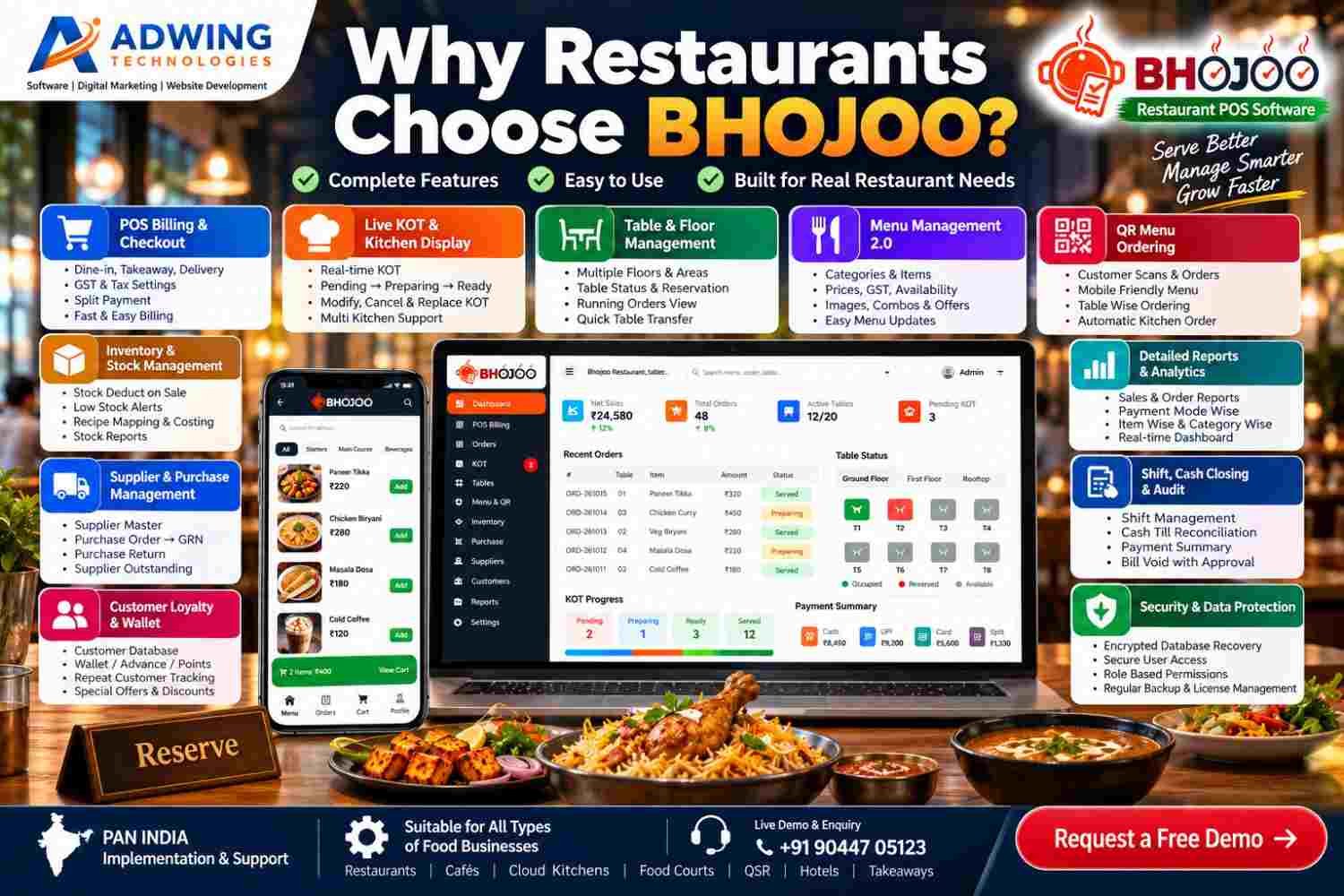
Bhojoo is designed as a complete restaurant operating system where billing, orders, KOT, tables, menu, inventory, purchases, suppliers, customers, loyalty, payments, shifts, reports and security work together. It is designed for restaurant owners who want more control over their operations—not just a faster way to print a bill.
Bhojoo Is More Than Restaurant Billing Software
Many restaurant applications begin and end with POS billing.
Select items.
Create bill.
Take payment.
Print receipt.
That may be enough for a very small counter, but a restaurant has much more happening behind the bill. Bhojoo connects the restaurant workflow from the moment the order begins. A typical Bhojoo workflow can look like:
Customer/Table → Order → KOT → Kitchen → Additional Order → Final Bill → Payment → Inventory → Reports
The same system can then extend into supplier purchases, customer loyalty, cash closing and business analytics. That connected workflow is one of the biggest reasons a restaurant owner should consider Bhojoo.
1. Fast POS Billing That Connects with the Entire Restaurant
Billing should be fast, but speed alone is not enough. The bill should also remain connected with the restaurant table, KOT, payment, inventory and reporting system.
Bhojoo POS Billing is designed for restaurant workflows including Dine-In, Takeaway and Delivery, according to the configured setup.Users can select menu items, quantity and applicable pricing while the system maintains the transaction inside the restaurant workflow.For busy restaurants, cafés and food outlets, this means less dependence on handwritten notes and disconnected billing records.
Customer Bill and Final Settlement Are Different
A particularly practical feature is that the customer bill can be generated before the transaction is finally settled.
This reflects how restaurants actually work.The customer may ask for the bill, review it, and then pay a few minutes later.Bhojoo can maintain the running order until authorised settlement is completed.This gives the cashier and restaurant team better operational clarity.
2. Live KOT Creates a Direct Connection with the Kitchen
One of the biggest operational problems in restaurants is communication between the order-taking team and the kitchen. Bhojoo addresses this through Live KOT and Kitchen Display workflows. When an order reaches the kitchen, the team can track its status through stages such as:
Pending → Preparing → Ready → Served
This creates much clearer communication. The waiter does not need to repeatedly ask the kitchen whether an order is ready. The kitchen gets a structured view of incoming orders. Management gets visibility into pending KOT activity. For a busy restaurant, this can significantly improve order coordination.
3. Same Table, Additional Order, One Final Bill
Real restaurant customers rarely order everything at once.
They may begin with starters. Later they add another beverage. Then main course. Then dessert.
Bhojoo supports this real-life behavior through same-table repeat ordering and ADD KOT workflows. Newly ordered items can be sent separately to the kitchen without unnecessarily recreating the original transaction. At final settlement, the customer can still receive one combined bill. This is a small operational feature that can make a major difference during busy service hours.
4. Better Control When Customers Change Their Order
Customers change their minds. An item may need to be cancelled. Quantity may need to change. One dish may need to be replaced with another.
A restaurant management system should not simply erase the previous activity and pretend nothing happened. Bhojoo supports controlled KOT modifications so operational changes can be handled more systematically. This improves both kitchen communication and management accountability.
5. Smart Table & Floor Management
Restaurants with multiple dining areas need more than a numbered table list. Bhojoo can organize restaurant seating into different floors or areas, such as Main Hall, Family Section, Rooftop, Ground Floor, Outdoor Area or other restaurant-specific layouts.
The team can view table status and understand which tables are available, occupied or reserved. This helps reception, waiters and cashiers operate from the same information rather than relying only on verbal communication. Reservations can also be handled as part of the table workflow.
6. Customers Can Order Through QR Menu
Modern customers increasingly prefer digital convenience. With Bhojoo QR Menu Ordering, a customer can scan the restaurant’s QR code using a smartphone and access the menu. Depending on the configured workflow, customers can view dishes, prices and menu categories, select items and submit an order.
The real advantage is what happens next. The digital order does not remain separate from restaurant operations. It can move into the Bhojoo restaurant workflow and become available for kitchen/KOT processing.
The journey becomes:
Scan QR → View Menu → Select Food → Place Order → Live KOT → Kitchen
This gives restaurants a modern customer experience while keeping the operational side connected.
7. Advanced Menu Management for Real Restaurant Needs
Restaurant menus are constantly changing. Prices change. Seasonal dishes are added .Items become unavailable. Different categories need to be organised. Restaurants may want images, descriptions or recommended items. Bhojoo’s menu-management structure is designed to make these updates easier.
Instead of treating the menu as a simple price list, restaurants can maintain a more organised digital menu experience for both staff and QR customers.
8. Billing and Inventory Work Together
One of the strongest reasons to move beyond basic POS software is inventory control. If the restaurant sells 50 dishes but stock remains completely disconnected from sales, the owner still has to manually understand what was consumed. Bhojoo can connect restaurant billing with inventory and recipe-based consumption.
That means restaurant owners can develop better visibility over raw materials, current stock, stock transactions, low-stock situations and consumption. This is extremely useful for controlling one of the biggest restaurant expenses: Food Cost.
9. Recipe Costing Helps Owners Understand What They Are Actually Selling
Revenue alone does not determine restaurant profitability. A dish may sell well but still produce a poor margin if ingredient costs are too high. Recipe mapping and costing allow restaurant owners to better understand how menu sales relate to raw-material consumption. This creates a stronger management foundation for controlling wastage, identifying expensive recipes and evaluating menu profitability.
Bhojoo therefore moves restaurant owners beyond the simple question: “How much did we sell?” towards the more useful question: “How efficiently did we sell it?”
10. Supplier & Purchase Management Connects the Back Office
Restaurant inventory comes from suppliers. Vegetables, grocery items, dairy products, beverages, packaging and other materials need to be purchased continuously. Bhojoo’s supplier and procurement workflow can help connect these activities through processes such as: Supplier → Purchase Order → Approval → GRN → Stock → Supplier Account
Purchase returns and supplier outstanding can also form part of the procurement workflow. This gives restaurant owners a much clearer picture of what was purchased, what was received and what remains payable.
11. Customer Loyalty & Wallet Can Encourage Repeat Business
A good restaurant does not only need new customers. It needs customers to return. Bhojoo’s Customer Loyalty and Wallet capabilities allow restaurants to build stronger repeat-customer strategies.
Depending on the configured setup, restaurants can maintain customer information, wallet balances, advances, points, repeat-customer history, discounts or promotional benefits. Instead of every transaction being anonymous, restaurants can gradually create a valuable customer relationship database. This can become especially useful for cafés, family restaurants and outlets with regular local customers.
12. Cash, UPI, Card and Split Payment Support
Indian restaurants regularly receive payment through different modes. Bhojoo supports structured settlement through options such as:
Cash, UPI, Card and Split Payment.
Split payment is especially useful when customers want to divide one bill between multiple payment methods. For example, part of the bill may be paid through UPI and the remaining amount in cash. The transaction can remain connected to one order instead of requiring artificial duplicate bills.
13. Payment Mistakes Can Be Corrected with Better Control
Restaurant cashiers are human. Mistakes can happen. A UPI payment may accidentally be recorded as Cash. A payment mode may be selected incorrectly.In many basic billing systems, fixing this requires deleting or recreating the transaction.Bhojoo provides a more controlled approach where authorised corrections can be made with appropriate reasons and audit visibility.This protects both the cashier and the restaurant owner.
14. Shift and Cash Closing Helps Owners Reconcile the Day
One of the most important moments in restaurant operations happens after customers leave.
Day closing.
How much cash should be available?
How much came through UPI?
What was collected through card?
Were any bills corrected? Were there voided transactions?
Does the cashier’s amount match the software? Bhojoo’s Shift and Cash Closing workflow is designed to support this reconciliation process. For restaurant owners who are not physically present at the counter every minute, this gives much stronger operational control.
15. Detailed Reports Turn Transactions into Business Information
Restaurant software should not only record transactions. It should help the owner understand them. Bhojoo provides reporting and dashboard capabilities that can help owners review information related to sales, payments, orders, tables, KOT activity, inventory and other configured restaurant operations.
Reports can help answer practical questions such as: Which payment mode is being used most?
How much was sold today?
Which orders are still pending?
What stock is becoming low?
How are restaurant operations performing? Better information allows better decisions.
16. Different Staff Get Different Access
Your waiter should not have the same access as your administrator. Your kitchen staff should not be changing financial reports. Your cashier should not necessarily have unrestricted system configuration access.
Bhojoo uses role-based access and restrictions so different restaurant employees can receive the controls appropriate to their responsibilities. Possible operational roles include Admin, Cashier, Waiter, Kitchen and other configured user types. This reduces unnecessary access to sensitive functions.
17. Security and Encrypted Database Recovery
Restaurant data is valuable.
Orders, payments, customers, inventory, suppliers and reports represent months or years of business activity. Bhojoo’s newer security framework includes stronger controls around user access, data protection, database backup and encrypted database recovery.
This becomes especially important when restaurant software is being treated as a core operational system rather than a temporary billing utility. A restaurant owner should always think about not only how data is created—but how it can be protected and recovered.
18. Online Payment Framework Makes Bhojoo Ready for Digital Ordering
Restaurant ordering is increasingly moving beyond the counter. QR orders, online orders and digital customer experiences are becoming normal. Bhojoo includes an online payment framework that provides the foundation for supported online payment workflows. This helps prepare restaurant operations for a more digital ordering environment while maintaining the central POS and reporting system.
19. Bhojoo Is Built for the Whole Restaurant, Not One Employee
One of the strongest reasons to choose Bhojoo is that it is not designed only for the cashier. It connects multiple participants inside a restaurant.
The customer can interact through QR ordering.
The waiter works with tables and orders.
The kitchen receives KOT information.
The cashier manages billing and settlement.
The inventory team manages stock and purchases.
The owner or administrator gets reports, controls and audit visibility.
When everyone works through the same connected workflow, restaurant operations can become much easier to monitor.
Why Choose Bhojoo Instead of Basic POS Software?
The difference becomes clearer when you look at the complete system. Bhojoo can bring together:
- POS Billing & Checkout
- Dine-In, Takeaway and Delivery
- Live KOT & Kitchen Display
- Same-Table ADD KOT
- Table & Floor Management
- Reservations
- Advanced Menu Management
- QR Menu & Customer Ordering
- Inventory & Stock Management
- Recipe Mapping & Costing
- Supplier & Purchase Management
- Customer Loyalty & Wallet
- Cash, UPI, Card & Split Payments
- Payment Correction & Audit
- Shift & Cash Closing
- Detailed Reports & Analytics
- Role-Based Staff Access
- Online Payment Framework
- Security, Backup & Encrypted Database Recovery
Instead of purchasing different applications for these processes, restaurant owners can manage more of their operation through one connected platform.
Who Should Choose Bhojoo?
Bhojoo can be considered by businesses such as family restaurants, cafés, cloud kitchens, food courts, QSR outlets, takeaway restaurants, hotel restaurants and other organised food businesses.
It is particularly useful for restaurant owners who have moved beyond simply needing a bill printer and now want stronger control over kitchen operations, stock, staff, customers, suppliers and financial reporting.
Why Bhojoo Can Be a Better Long-Term Investment
The cheapest POS is not necessarily the lowest-cost restaurant system. If the owner later has to buy separate applications for inventory, QR menu, supplier management, reporting or customer loyalty, the restaurant may end up managing multiple disconnected systems.
The real value of Bhojoo comes from connecting these workflows. The restaurant can start with its immediate operational requirements and use a system designed around broader restaurant management. That makes Bhojoo particularly relevant for restaurants that want to build better processes as the business grows.
Built for Restaurants Across India
Bhojoo is designed for Indian restaurant workflows and can be demonstrated for restaurant requirements across India. Restaurants can discuss their number of tables, billing workflow, kitchen setup, menu, staff structure, inventory requirements and reporting expectations before final implementation.
Whether you operate a restaurant in a metro city or a growing regional market, the goal remains the same: faster service, better control and clearer business information.
See Bhojoo Working with Your Own Restaurant Name
Software should be evaluated through a real workflow—not only screenshots and feature lists. Restaurant owners can request a Bhojoo Live Demo and discuss how their actual restaurant operations can be handled. During the demonstration, you can review billing, tables, KOT, QR orders, payments, inventory, reports and other relevant modules.
Live Demo & Enquiry:
+91 90447 05123
Bhojoo Restaurant POS Software by Adwing Technologies
Serve Better. Manage Smarter. Grow Faster.
Frequently Asked Questions
Why should I choose Bhojoo for my restaurant?
Bhojoo combines restaurant billing with KOT, table management, QR ordering, inventory, purchases, suppliers, customer loyalty, payments, reports, staff controls and security workflows. This makes it suitable for restaurant owners looking for broader operational control rather than only billing.
Is Bhojoo only a billing software?
No. Billing is one component of Bhojoo. The platform is designed around broader restaurant operations including orders, KOT, tables, inventory, procurement, customer management, reporting and administrative controls.
Does Bhojoo support QR ordering?
Yes. QR-based menu and ordering workflows can allow customers to view the menu and place orders using their smartphones according to the configured restaurant setup.
Can Bhojoo manage inventory?
Yes. Bhojoo supports inventory and stock workflows and can connect restaurant operations with recipe mapping and consumption where configured.
Can Bhojoo manage suppliers?
Yes. Supplier, purchase, GRN, purchase return and supplier-account workflows can form part of Bhojoo’s procurement management.
Does Bhojoo support customer loyalty?
Bhojoo includes customer loyalty and wallet capabilities for supported setups, allowing restaurants to develop stronger repeat-customer engagement.
Can the owner see business reports?
Yes. Bhojoo provides restaurant dashboards and detailed operational reporting so authorised users can review relevant sales, payment, order, KOT and inventory information.
Can cashier payments be corrected?
Authorised workflows can support payment-mode corrections with reasons and audit visibility instead of simply deleting transaction history.
Does Bhojoo support cash closing?
Yes. Shift and cash-closing workflows can help restaurants reconcile collections and operational activity.
Is Bhojoo secure?
Bhojoo’s current feature set includes role-based controls, data protection, backups and encrypted database-recovery capabilities as part of its security approach.
How do I get a Bhojoo demo?
Contact Adwing Technologies on +91 90447 05123 and share your restaurant name and key requirements to arrange a Bhojoo demonstration.

Adwing Technologies
Business software, website design and digital growth support for organisations across India.
Related Business Insights

Turn Your Digital Presence Into Qualified Enquiries
Discuss your website, SEO, software or digital marketing requirement with Adwing Technologies.