
Restaurant Management Software | Bhojoo Pos Software by Adwing Technologies
Restaurant Management Software: Complete POS, KOT, Billing, Inventory & Reporting Solution Running a restaurant successfully requires much more than taking orders and generating bills. Restaurant owners need to manage billing, kitchen orders, tables, staff, inventory, payments, customer records and business reports every day. A modern Restaurant Management Software helps bring all these operations into one […]
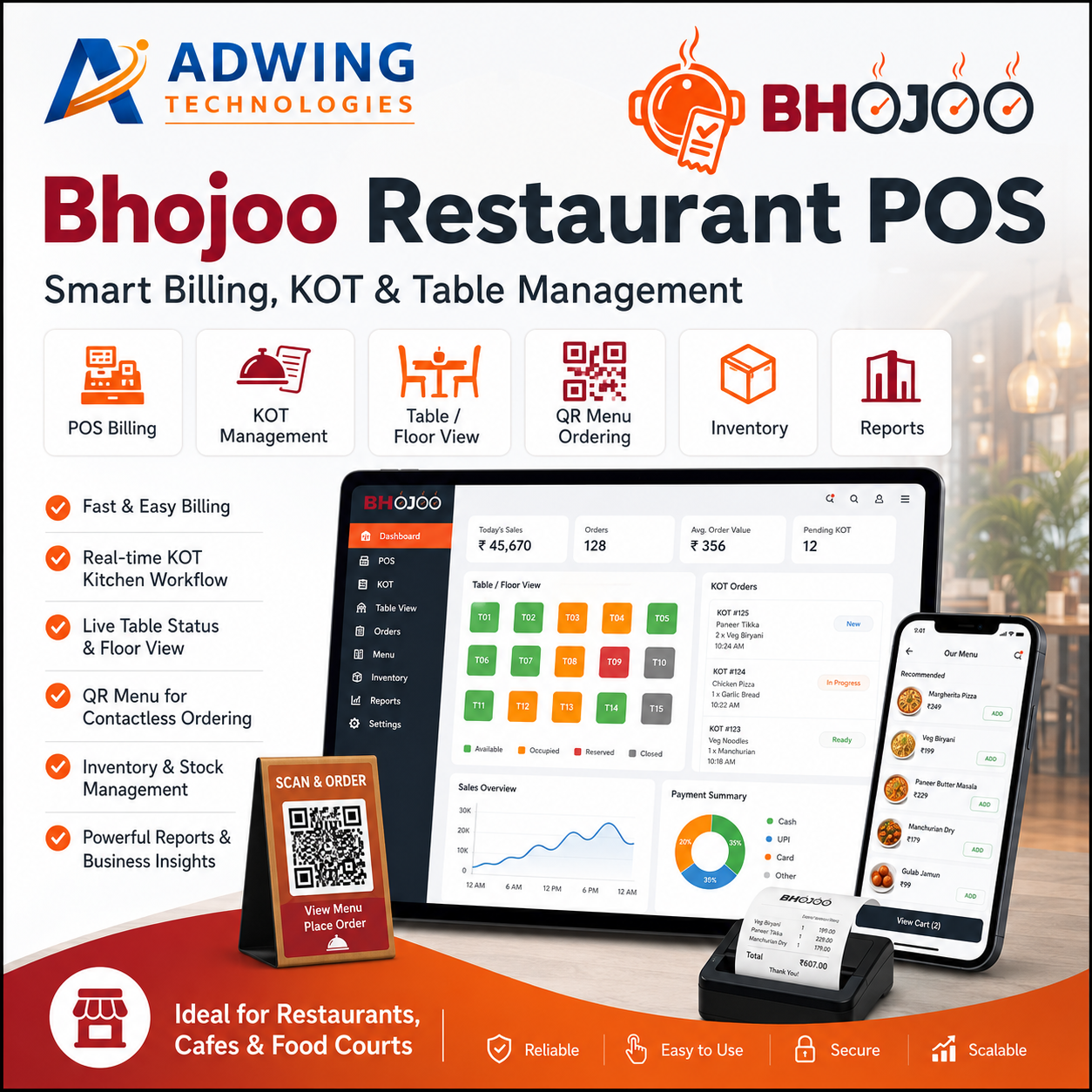
Restaurant Management Software: Complete POS, KOT, Billing, Inventory & Reporting Solution
Running a restaurant successfully requires much more than taking orders and generating bills. Restaurant owners need to manage billing, kitchen orders, tables, staff, inventory, payments, customer records and business reports every day.
A modern Restaurant Management Software helps bring all these operations into one system so restaurants can work faster, reduce manual errors and improve control over daily activities.
For restaurants, cafés, food courts, cloud kitchens and quick-service outlets, software like Bhojoo Restaurant POS by Adwing Technologies can simplify both front-desk and back-end restaurant operations.
What is Restaurant Management Software?
Restaurant Management Software is a digital system designed to manage the complete workflow of a food business.
Instead of maintaining separate registers, handwritten KOT slips, manual stock records and disconnected reports, restaurant owners can use one centralized platform to manage:
- POS Billing
- KOT / Kitchen Orders
- Table Management
- Menu Management
- Dine-In Orders
- Takeaway Orders
- Delivery Orders
- Inventory & Stock
- Staff & User Roles
- Customer Management
- Payments
- Sales Reports
- Order History
- Business Analytics
This helps restaurant teams coordinate better and gives owners clearer visibility into business performance.
Why Restaurants Need POS and Management Software
Manual restaurant operations can create common problems such as:
- Wrong billing
- Lost kitchen orders
- Delayed service
- Table confusion
- Stock mismatch
- Payment errors
- Untracked cancelled items
- Poor sales visibility
- Difficulty monitoring staff activities
A good restaurant POS billing software helps reduce these problems by creating a structured digital workflow.
The objective is simple: faster service, better accuracy and improved operational control.
1. Fast POS Billing
Billing is one of the most important restaurant operations.
Restaurant POS software allows staff to quickly select menu items, create bills and process payments.
A fast billing system can help reduce customer waiting time, especially during busy hours.
Modern POS billing may support:
- Dine-in bills
- Takeaway bills
- Delivery bills
- Discounts
- Taxes
- Round-off
- Cash received
- Change return
- Split payments
This makes the billing process more flexible and practical for everyday restaurant operations.
2. KOT – Kitchen Order Ticket Management
KOT is the communication link between the ordering staff and the kitchen.
When a waiter or cashier places an order, the KOT can be generated for kitchen preparation.
Restaurant software can help manage:
- New KOT
- Repeat KOT
- Updated orders
- Cancelled items
- Replaced items
- KOT reprint
- Kitchen status
This creates a clearer workflow between the front desk and kitchen team. For busy restaurants, good KOT management can significantly improve kitchen coordination.
3. Table Management
Restaurants with dine-in service need real-time visibility of table status. A table management module can show:
- Vacant tables
- Occupied tables
- Reserved tables
- Active orders
- Table-wise bill amount
Restaurants with multiple floors can also manage tables floor-wise.This makes it easier for waiters and managers to know which tables are available and which require attention.
4. Menu Management
Menu management allows restaurant owners to organize food items properly. Menu items can be categorized into groups such as:
- Starters
- Main Course
- South Indian
- Beverages
- Desserts
- Snacks
- Combos
Each item can include price, category and tax information.A well-organized menu helps billing staff locate items quickly and improves order accuracy.
5. Dine-In, Takeaway and Delivery Orders
Modern restaurants usually handle multiple order types.Restaurant Management Software can manage:
Dine-In
Customers place orders at a table and settle the bill after dining.
Takeaway
Orders are prepared for pickup.
Delivery
Orders are delivered to a customer address.
Handling all three order types from the same system helps restaurant owners maintain better order records.
6. QR Menu Ordering
QR-based ordering has become popular in restaurants and cafés. Customers can scan a QR code using their smartphone to access the menu. Depending on the configured workflow, they may be able to:
- View menu items
- Check prices
- Select products
- Submit orders
QR menus reduce dependency on printed menus and provide a more modern customer experience.
7. Inventory & Stock Management
Food cost and stock control are critical for restaurant profitability.Restaurant inventory software helps track:
- Raw materials
- Available stock
- Purchase entries
- Stock consumption
- Wastage
- Stock adjustments
- Low-stock items
Without proper inventory management, restaurants may experience excessive wastage and inaccurate food costing.A digital inventory system helps owners monitor stock more closely.
8. Recipe Costing and Auto Stock Consumption
Advanced restaurant management systems can connect menu items with recipes.For example, if one dosa is sold, configured ingredient quantities may be deducted from inventory.This helps restaurants understand:
- Ingredient consumption
- Food cost
- Item profitability
- Recipe usage
- Stock variance
Recipe costing is especially useful for restaurants that want stronger control over food margins.
9. Supplier and Purchase Management
Restaurant stock usually comes from multiple suppliers.A complete restaurant system can also support purchasing workflows such as:
Supplier → Purchase Order → Approval → Goods Receipt This allows restaurant owners to maintain records of:
- Suppliers
- Purchases
- Received goods
- Purchase returns
- Outstanding supplier payments
- Payment history
For growing restaurants, supplier management becomes an important part of inventory control.
10. Wastage Management
Food wastage can directly affect restaurant profitability.A wastage module allows staff to record stock that has been:
- Damaged
- Expired
- Spilled
- Overprepared
- Unusable
Recording wastage helps owners understand where stock loss is occurring.
11. Multiple Payment Modes
Customers use different payment methods.Restaurant POS software can support:
- Cash
- UPI
- Card
- Wallet
- Split Payment
Split payment is especially useful when a customer wants to pay one bill using multiple methods.Payment-mode reports also help restaurant owners reconcile daily collections.
12. Staff Roles and Permissions
Not every employee should have access to every function.Restaurant software can provide role-based permissions for:
- Owner
- Admin
- Cashier
- Waiter
- Kitchen Staff
- Manager
For example, a waiter may be allowed to create orders but may not have permission to change settings or view financial reports.
This improves security and operational control.
13. Customer Management
Restaurants can store customer information for future reference.Customer management may include:
- Name
- Phone number
- Order history
- Delivery address
- Repeat customer records
This can help restaurants improve customer service and engagement.
14. Reports and Analytics
Restaurant Management Software should provide more than billing. Owners need reports to understand business performance. Useful reports may include:
- Daily Sales
- Total Orders
- Payment Summary
- Item Sales
- Order Type Summary
- Table-wise Sales
- Inventory Reports
- Purchase Reports
- Expense Reports
- Cancelled Orders
- Business Analytics
These reports help owners make better operational decisions.
15. Restaurant Dashboard
A dashboard gives restaurant owners a quick snapshot of daily activity.A restaurant dashboard can display:
- Net Sales
- Orders
- Recent Orders
- Payment Summary
- Table Status
- KOT Progress
- Inventory Alerts
- Sales Trends
This helps management monitor the restaurant without opening multiple reports.
Online and Offline Restaurant Management Software
Internet interruptions can affect restaurant billing if the software is completely dependent on a constant connection. For this reason, many restaurants prefer online/offline restaurant management software. A hybrid setup can allow important local operations to continue while also syncing data with the cloud when internet connectivity is available.
This can provide better continuity for restaurants that cannot afford billing downtime.
Restaurant Software for Cafés
Cafés usually need:
- Fast counter billing
- KOT
- Takeaway
- Inventory
- Customer records
- Reports
Restaurant management software can be configured for smaller café workflows without unnecessary complexity.
Restaurant Software for Cloud Kitchens
Cloud kitchens rely heavily on order management. Software can help them manage:
- Kitchen orders
- Delivery orders
- Menu items
- Inventory
- Payments
- Sales reports
Centralized order tracking can reduce operational confusion.
Restaurant Software for Food Courts
Food courts and high-volume outlets require fast billing and organized kitchen communication. POS and KOT modules can help staff process multiple orders efficiently during peak periods.
Benefits of Restaurant Management Software
Using a modern restaurant system can provide several benefits:
Faster Billing
Reduce billing time and customer waiting.
Better Kitchen Coordination
KOT keeps order information organized.
Improved Inventory Control
Track stock, recipe consumption and wastage.
Better Payment Tracking
Monitor cash, UPI, card and split payment transactions.
Stronger Business Reports
Understand sales and performance.
Reduced Manual Work
Automate repetitive restaurant tasks.
Better Customer Experience
Faster service and accurate orders improve customer satisfaction.
Why Choose Bhojoo Restaurant POS?
Bhojoo Restaurant POS by Adwing Technologies is designed to manage essential restaurant workflows from one platform.It can support restaurant operations such as:
POS Billing + KOT + Tables + Menu + Inventory + Payments + Reports + Staff Control
The system is suitable for restaurants, cafés and food businesses that want a simple and practical management solution.
Who Can Use Restaurant Management Software?
Restaurant management software can be useful for:
- Family Restaurants
- Cafés
- Fast Food Outlets
- Cloud Kitchens
- Food Courts
- Takeaway Businesses
- Multi-table Restaurants
- Casual Dining Restaurants
- Small Restaurant Chains
Restaurant Management Software in India
Restaurants across India are increasingly adopting digital billing and management systems. As customers expect faster service and digital payment options, restaurants need software that can handle both operational and reporting requirements .A reliable Restaurant Management Software in India should be easy to use, flexible and suitable for local restaurant workflows.
Conclusion
A restaurant runs on many connected processes. Billing, kitchen orders, tables, stock, staff, payments and reports must all work together.A complete Restaurant Management Software helps organize these operations into a single workflow.
For restaurants looking for a practical POS solution, Bhojoo Restaurant POS by Adwing Technologies provides tools for billing, KOT, table management, inventory, payments and reports. If you want to reduce manual work, improve billing speed and gain better control over your restaurant operations, a modern restaurant management system can be a valuable investment.

Adwing Technologies
Business software, website design and digital growth support for organisations across India.
Related Business Insights
Turn Your Digital Presence Into Qualified Enquiries
Discuss your website, SEO, software or digital marketing requirement with Adwing Technologies.